Surface and Content flags of Sin SWL textures - Part III
by Eutectic
|
1. Content properties
|
We will now look at how to set the Contents register in Sinview to set the default content flags for your SWL textures. The value you give to the Contents field in Sinview will determine what default content flags will be set by default in your texture when you select it and open the surface inspector in SinEd as can be seen outlined in red in the images below:
|
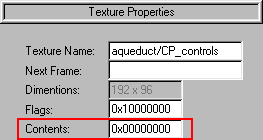
Sinview
|
SETS THESE
|
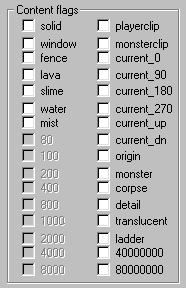
SinEd
|
|
3. How the Contents register works
|
Contents 0x00000000
|
The register always starts with 0x followed by 8 digits. The 0x part can't be changed but any of the following 8 digits can be set to any hexadecimal value from 0 to F (0 to 15 in decimal) so each of these digits contain 4 bits (a nibble). Each individual bit, when set to 1, checks a content flag for the texture. If the bit is 0, the content flag is not checked. Since there are 8 of those 4-bit digits, that's 32 bits total.
Sounds familiar? Well it should because the Contents register uses exactly the same principle as the Flags register for the surface properties. But, unlike the Flags register, there are no complicated surfbit combinations to figure out. Each bit in the Contents register sets a specific content flag in your texture.
So without further ado, let's break them down the Contents register and see to what flag each of the individual bits are assigned to:
|
|
0 |
This part is reserved (do not use)
|
|
x |
|
0 |
Bit 3 : 80000000
Bit 2 : 40000000
Bit 1 : ladder
Bit 0 : translucent
|
|
0 |
Bit 3 : detail
Bit 2 : corpse
Bit 1 : monster
Bit 0 : origin
|
|
0 |
Bit 3 : current_dn
Bit 2 : current_up
Bit 1 : current_270
Bit 0 : current_180
|
|
0 |
Bit 3 : current_90
Bit 2 : current_0
Bit 1 : monsterclip
Bit 0 : playerclip
|
|
0 |
Bit 3 : 8000
Bit 2 : 4000
Bit 1 : 2000
Bit 0 : 1000
|
|
0 |
Bit 3 : 800
Bit 2 : 400
Bit 1 : 200
Bit 0 : 100
|
|
0 |
Bit 3 : 80
Bit 2 : mist
Bit 1 : water
Bit 0 : slime
|
|
0 |
Bit 3 : lava
Bit 2 : fence
Bit 1 : window
Bit 0 : solid
|
|
Before we go on here, I want to mention that the flags which are described as: 80000000, 40000000, 8000, 4000, 2000, 1000, 800, 400, 200, 100 and 80 don't do anything at all so just ignore them.
|
Now, in order to figure out the hexadecimal value to give to each of the nibbles when you want a content flag or a combination of content flags to be set, just use the same method as described for the Flags register:
|
|
0 |
This part is reserved (do not use)
|
|
x |
|
0 |
Bit 3 : when set is worth 8
Bit 2 : when set is worth 4
Bit 1 : when set is worth 2
Bit 0 : when set is worth 1
|
|
0 |
Bit 3 : when set is worth 8
Bit 2 : when set is worth 4
Bit 1 : when set is worth 2
Bit 0 : when set is worth 1
|
|
Although only the first 2 nibbles are displayed above, it's the same for all 8 of them. So let's say you made a brand new texture and you want to have the translucent, current_90 and water flags preset on your texture. Well, you would figure out the value this way:
|
Bit 0 of the 1st nibble has to be set. Value: 1
Bit 3 of the 4th nibble has to be set. Value: 8
Bit 1 of the 7th nibble has to be set. Value: 2
|
So now all you have to do is add the values for each nibble and assign the result to the register:
|
|
0 |
This part is reserved (do not use)
|
0 |
|
x |
x |
|
0 |
Bit 0 : translucent (set, value 1)
|
1
|
|
0 |
No bits set (value 0)
|
0
|
|
0 |
No bits set (value 0)
|
0
|
|
0 |
Bit 3 : current_90 (set, value 8)
|
8
|
|
0 |
No bits set (value 0)
|
0
|
|
0 |
No bits set (value 0)
|
0
|
|
0 |
Bit 1 : water (set, value 2)
|
2
|
|
0 |
No bits set (value 0)
|
0
|
|
So if you set the value of the Contents field to 0x10080020 for your texture in Sinview and hit the Save .SWL button, the next time you load your texture in SinED, select it and call the surface inspector, it will have the translucent, current_90 and water content flags set by default.
|
This concludes our tutorial on how to use Sinview to set the default surface and content properties of your new SWL textures. Of course, this can also be used to modify the default properties of your existing textures if you want. But the bottom line is that Sinview is more than just a Sin model and texture viewer, it's an extremely useful tool for creating or customizing SWL textures.
|
Part II
|