|
One of the cooler effects you can do, is make windows in your
levels. To get started, lets make an empty room, with some
lights and a Player_start. Make the room spacious enough to
place a wall in the middle of the room.
1.) Create a wall, make it tall and not too wide.
2.) Make a brush inside the wall, where you want the window to be.
3.) Go to the "Edit" menu, choose
"CSG Subtract". This will create a new brush inside the wall
and negate that part of the wall so that there is no conflicts
from brush clipping.
4.) Making sure that only the window
you just made is selected, press "S" to bring up the surface
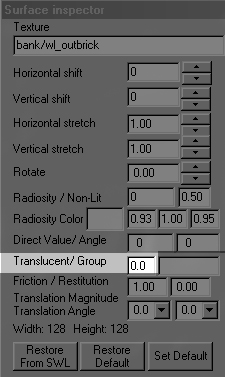
inspector. To the right, you'll see a picture, with a highlighted
section. The current value is 0.0 which equals completely
solid so you will not see through it. 0.0 is the minimum value,
1.0 is the maximum, which is completely transparent. A good
choice for a window is 0.5-0.6 but you can play around with
the value to find what your looking for. 5.)
Save & compile your map and load the level and enjoy your
window.
|
|
|
In real life, you don't come across a window
that you can't break too often, so it only makes sense that
you want your windows to be broken. Open your map you made
with the window from above. Select the window brush and press
"N" to bring up the entity editor. Double click on "func_glass".
Now its breakable. Check above the flag boxes in the entity
editor for the different flags to set the properties for damage
and such.....
|